Adaptive – Workday
What is Workday Adaptive Planning?
Workday Adaptive Planning is the University’s planning solution designed for budget planning, forecasting, and reporting. Adaptive Planning will be available in October FY26, replacing both Oracle PBSC (Plan UW) and our Compensation Administration Tool (CAT).
Training for Adaptive Planning started in August and emails were sent to those who have the security role for Adaptive Planning. Training/Practice version for Adaptive Planning is now available within the production environment. Log in to the Adaptive production environment, click on Global Menu, then Processes, then Process Guide-Training. Then select Training-Forecast or Training-Budget, at the bottom, as needed.
To get access to Adaptive Planning, please work with your Dean’s office or divisional finance office to initiate role assignment requests in Workday. This KB has additional information.
Finance Facilitators – Budget/Adaptive
We will continue to engage with our Finance Facilitators Group (previously referred to as Madison Advisory Group or MAG). Any materials relevant to these periodic meetings will be shared via Box (access required). Please click here to find the Finance Facilitator(s) for Budget/Adaptive for your S/C/D.
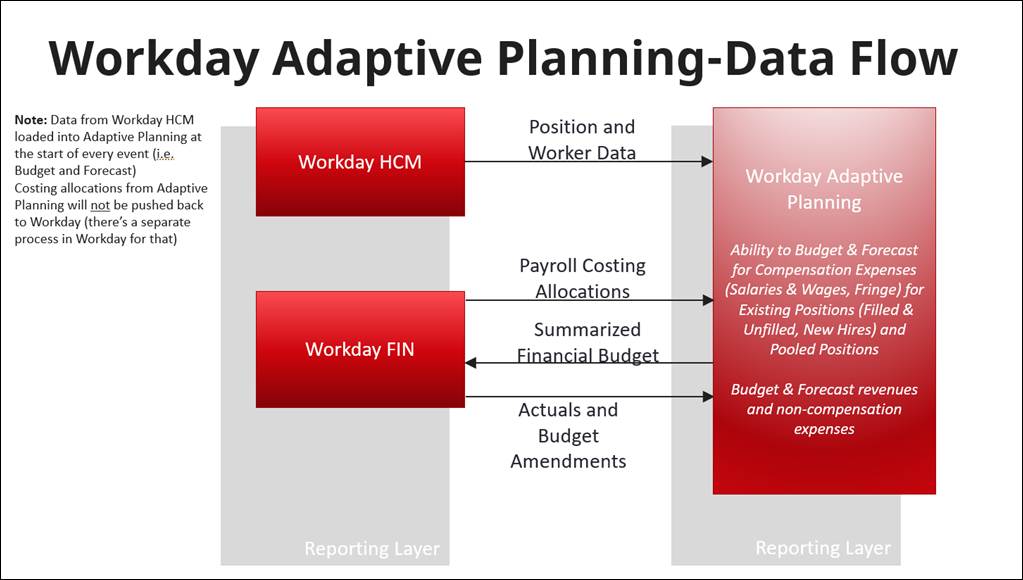
Long Description of Workday Adaptive Planning – Data Flow
This diagram illustrates how data moves between three systems: Workday HCM, Workday FIN, and Workday Adaptive Planning.
A note on the left side states that data from Workday HCM enters Adaptive Planning at the beginning of each planning event, such as budgeting and forecasting. It also notes that costing allocations from Adaptive Planning are not pushed back to Workday because a separate process exists within Workday for that function.
The diagram contains three vertical sections:
- Workday HCM (left)
- Sends Position and Worker Data to Workday Adaptive Planning.
- Workday FIN (center-left)
- Sends Payroll Costing Allocations to Workday Adaptive Planning.
- Receives Summarized Financial Budget information from Workday Adaptive Planning.
- Exchanges Actuals and Budget Amendments with Workday Adaptive Planning, indicating ongoing updates between the systems.
- Workday Adaptive Planning (right)
- Uses workforce and payroll information to support budgeting and forecasting for compensation expenses, including salaries, wages, fringe costs, existing positions, filled and unfilled positions, new hires, and pooled positions.
- Supports budgeting and forecasting of revenues and non-compensation expenses.
Adaptive Planning Scope
| UW End-to-End Business Processes | Workday Functional Areas | Workday SKU Modules | Phase* |
|---|---|---|---|
| Operational Budgeting | Financial Planning | PLNF - Financial Planning | R1 |
| Compensation Planning | Financial Planning & Workforce Planning | PLNF - Financial Planning & PLNW - Workforce Planning | R1 |
| Planning Allocations | Financial Planning | PLNF - Financial Planning | R1 |
| Fiscal Year Forecasting | Financial Planning | PLNF - Financial Planning | R1 |
| Mulit-year Forecasting | Financial Planning | PLNF - Financial Planning | R1/2 |
| Auxiliary Driver Based Budgeting | Financial Planning | PLNF - Financial Planning | R1 (was in phase 2) |
| Strategic Long Range Financial Planning | Financial Planning | PLNF - Financial Planning | 2 |
| Tuition & Fee Revenue Driver Based Modeling | Financial Planning | PLNF - Financial Planning | 2 |
| Capital Projects and Assets Planning & Budgeting | Financial Planning | PLNF - Financial Planning | 2 |
| Commitments Planning | Financial Planning | PLNF - Financial Planning | **R1/2 |
| Endowment Modeling | Financial Planning | PLNF - Financial Planning | 2 |
Adaptive KBs and Job Aids
Adaptive Planning Access and Basic Navigation
Forecast and Budget Pre-Seed Navigation
Revenue and Non-Compensation Planning
Overview and Navigation of Sheets in Adaptive Planning
Additional job aids can be found here – Job Aid Library. Enter ‘Adaptive Planning’ in the search field at the top of the page.